

Cordless cleaning has evolved dramatically — and at the forefront of that evolution stands the Dyson V11, a sleek fusion of smart technology and raw suction strength. Equipped with intelligent suction control, multiple power modes, and a crisp digital display, the V11 turns everyday cleaning into a high-performance experience. But behind that seamless power lies the true heart of the machine — the Dyson V11 battery.
The key to keeping your Dyson V11 Animal, V11 Torque Drive, or V11 Cordless Vacuum Cleaner operating like new is understanding how to maintain, replace, and prolong the life of your battery. Everything you need to know, from runtime and replacement options to professional maintenance advice and frequently asked questions, will be covered in this book.
Understanding the Dyson V11 Battery
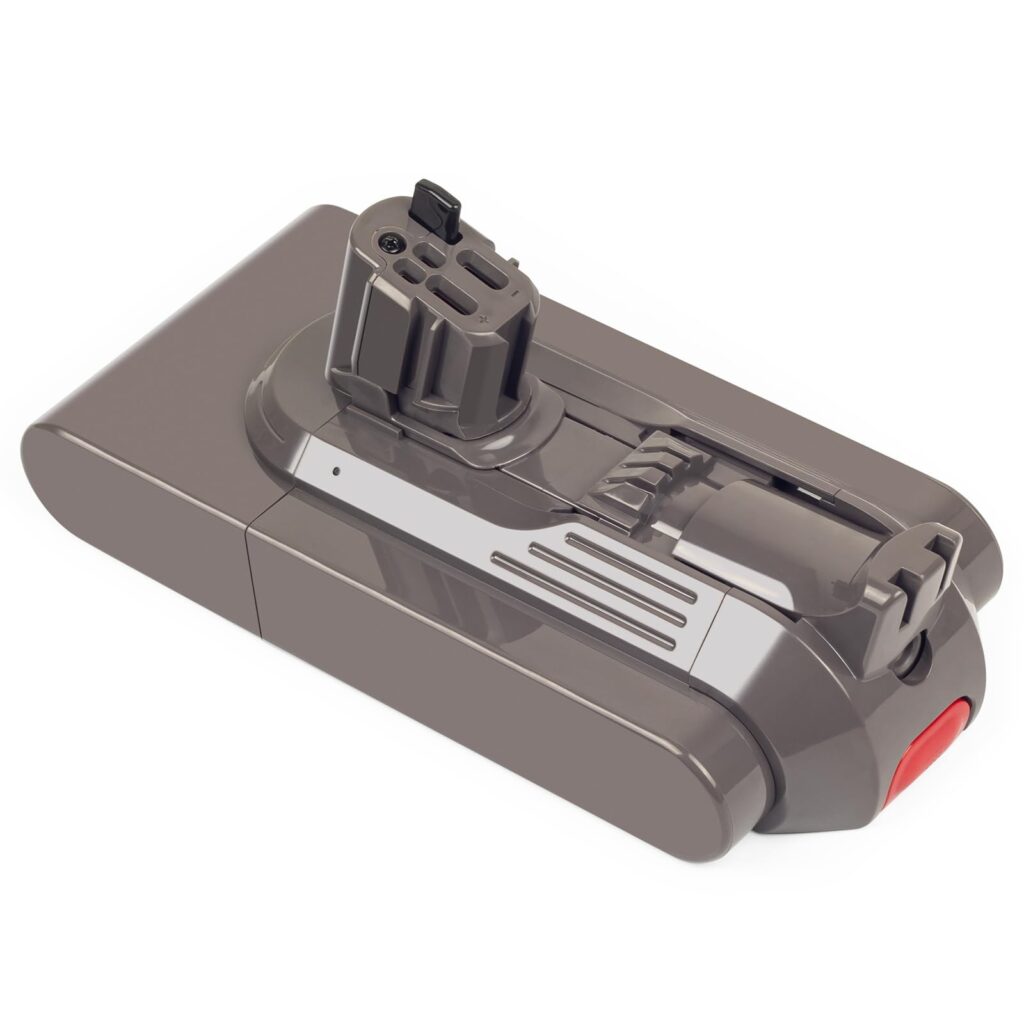
Dyson’s smart digital motor is powered by the high-capacity, seven-cell lithium-ion Dyson V11 battery. The battery, which is made to provide steady suction and a long lifespan, easily connects to the digital system of the vacuum to track performance and optimize energy consumption in real time.
By dividing power efficiently among cells, Dyson’s savvy battery management system protects against overheating and overcharging. The V11 may be screw-in or click-in, depending on your model:
| Dyson Model | Battery Type | Average Runtime | Replacement Type |
| Dyson V11 Animal | 7-cell Lithium-ion | Up to 60 minutes | Screw-in |
| Dyson V11 Torque Drive | 7-cell Lithium-ion | Up to 60 minutes | Screw-in |
| Dyson V11 Outsize | 8-cell Lithium-ion | Up to 120 minutes (dual battery) | Click-in |
| Dyson V11 Absolute | 7-cell Lithium-ion | 60 minutes | Click-in |
Note: Runtime varies based on power mode, floor type, and attachments.
Dyson V11 Battery Runtime and Lifespan
The thoughtful power management system of the Dyson V11 cordless vacuum is among its most remarkable features. The Dyson battery strikes the ideal balance between power and efficiency by automatically modifying suction according to the kind of surface. As a result, you may obtain powerful, steady suction without needlessly depleting the battery.
With an average runtime of up to 60 minutes on a full charge, the Dyson V11 vacuum battery is perfect for cleaning a whole apartment or small house in a single session. However, the runtime changes based on the cleaning mode that is chosen:
| Power Mode | Estimated Runtime | Ideal For |
| Eco Mode | Up to 60 minutes | Every day cleaning on hard floors |
| Auto/Medium Mode | 30–40 minutes | Mixed surfaces, such as rugs and tiles |
| Boost Mode | 10–12 minutes | Deep cleaning carpets and pet hair |
Regarding battery lifespan, the battery is intended to last approximately three to five years under typical household use before noticeable degradation occurs. Proper charging habits and maintenance play a big role in extending its life. This clever system guarantees maximum performance while conserving energy when less power is needed. For example:
- Frequent use of Boost Mode can shorten the lifespan since it draws maximum power.
- Storing your vacuum in extreme heat or cold can damage the lithium-ion cells.
- Using the original Dyson charger or adapter ensures safe, consistent charging.
With good care — such as avoiding full discharges, cleaning the battery contacts, and keeping it at room temperature — your Dyson V11 cordless vacuum will maintain strong performance and a healthy runtime for years.
Can You Replace the Dyson V11 Battery?
Yes — and it’s quite simple! Dyson designed the V11 battery replacement process to be user-friendly. Depending on your model, you’ll have one of two types:
- Screw-in battery: Found in older models like the V11 Animal or Torque Drive. You’ll need a small screwdriver to remove three screws.
- Click-in battery: Found in newer V11 variants. It detaches easily with a single button press, allowing instant swapping.
Steps for Dyson V11 Vacuum Battery Replacement:
- Turn off and unplug your vacuum.
- If your model uses screws, remove them carefully using a small screwdriver.
- Detach the old battery.
- For click-in models, simply press the battery release button and slide the old one out.
- Align and attach the new Dyson V11 battery replacement
- For screw-in versions: secure it with the same screws.
- For click-in versions: push until you hear a click confirming it’s locked in place.
- Charge fully before first use (about 4.5 hours).
You can purchase replacements from authorized compatible battery providers like USA Batteries to ensure compatibility and safety.
Signs That Your Battery Needs Replacing.
If your Dyson V11 vacuum battery begins to show the following signs, it might be time for a Dyson battery replacement:
- Reduced runtime (e.g., runs only a few minutes)
- The battery is flashing blue even after a full charge
- The vacuum shuts off suddenly
- Longer charging time or failure to charge
- Error lights or warning messages on the display
The Dyson battery flashing a blue light typically indicates the battery is low or not charging correctly. If the issue persists even after proper charging, replacement is the best solution.
Can You Leave the Dyson V11 on Charge All the Time?
Yes, you can safely leave your Dyson V11 cordless vacuum on charge without harming the battery. The built-in smart charging system automatically stops drawing power once the battery reaches 100%, preventing overcharging.
However, for long-term storage:
- Store the vacuum in a cool, dry place.
- Avoid leaving it in direct sunlight or near heat sources.
- Charge the battery to around 50% if not using it for several months.
This helps preserve overall battery health and prevents deep discharge damage.
Battery Maintenance Tips.
Proper care and charging habits can significantly extend the life of your Dyson V11 vacuum battery. Follow these essential maintenance tips:
- Use the official Dyson charger – Avoid generic adapters that can overheat cells.
- Charge after every use – Keeping your battery partially charged is healthier than draining it completely.
- Clean battery contacts – Wipe with a dry cloth occasionally to prevent dust buildup.
- Avoid extreme temperatures – Don’t charge or store below 5°C or above 35°C.
- Use correct power modes – Switch between Eco, Auto, and Boost modes wisely based on cleaning needs.
Following these tips ensures consistent suction performance and prolongs your battery’s life.
Dyson Vacuum Battery Flashing Lights.
Here’s a complete guide to what the Dyson battery lights mean:
| Light Indicator | Meaning | Action to Take |
| Solid Blue Light (while charging) | The battery is charging normally | Leave it on charge until the light goes off |
| Flashing Blue Light | The battery is low or not properly connected to the charger | Reconnect the charger securely and ensure it’s plugged into a working outlet |
| Flashing Blue Light (after charging) | Possible battery fault or charging issue | Try a different socket, clean contacts, or consider a battery replacement if the problem persists |
| No Light While Charging | The battery is not charging, or the charger isn’t connected | Check the adapter and outlet; test with another device |
| Solid Green Light (when unplugged) | The Battery is fully charged | Ready for use |
| Flashing Amber Light | The battery temperature is too low or too high to charge | Allow the vacuum to reach room temperature before recharging |
| Solid Red Light | Permanent battery fault detected | Contact Dyson Support or replace the battery |
| Flashing Red Light | Temporary error or low voltage issue | Unplug, wait a few minutes, then reconnect and charge again |
Troubleshooting Common Issues.
| Issue | Possible Cause | Solution |
| Battery not charging | Loose adapter connection or faulty socket | Reconnect, test outlet |
| Flashing blue light | Low charge or internal fault | Recharge fully; if it persists, replace the battery |
| Red light blinking | Battery error or overheating | Allow to cool down, check airflow |
| Reduced runtime | Battery degradation | Replace or switch to Eco Mode |
BATTERY WAR: Original vs. Compatible Dyson V11 Replacement Batteries.
| Feature | Genuine Dyson Battery | USA BATTERIES, compatible Replacement |
| Compatibility | Perfect fit | May vary by model |
| Safety | Certified by Dyson | Tested against OEM standards. |
| Warranty | 1–2 years | 12 Months warranty coverage |
| Price | Higher | Lower |
| Performance | Consistent and efficient | High Capacity performance |
Pro Tip: If using a third-party battery, ensure it’s labeled as Dyson V11 compatible and includes built-in protection against overcharging and overheating.
Information Hub.
1. How long should my Dyson V11 battery last?
Generally, the battery lasts three to five years, depending on how frequently you use and charge it. Maintaining moderate use, avoiding high temperatures, and providing proper care all contribute to a longer battery life and steady suction force over time.
2. How do I know if a Dyson battery needs replacing?
Flashing blue lights, reduced runtime, or non-charging are indicators that your Dyson V11 batteries need to be replaced. The battery has probably worn out and needs to be changed to restore optimal performance if troubleshooting doesn’t resolve the problem.
3. What is the runtime for the Dyson V11?
The Dyson V11 vacuum provides up to 60 minutes in Eco Mode, 30–40 minutes in Auto Mode, and 10–12 minutes in Boost Mode per full charge. Runtime varies depending on the floor type, suction setting, and attachments used during cleaning.
4. Can you replace the Dyson V11 battery?
Yes, you can easily perform a Dyson V11 battery replacement. Newer models have click-in batteries for quick swaps, while older versions require screws. Always choose a genuine Dyson or trusted replacement to maintain safety, performance, and battery health.
5. Can you leave the Dyson V11 on charge all the time?
Yes, the Dyson V11 can safely stay on charge. Its smart system stops charging automatically when full. However, if storing for months, keep the battery around 50% charged and unplug it to preserve long-term battery health.
Wrap Up!
Your Dyson V11 cordless vacuum’s remarkable performance is powered by the Dyson V11 battery. You can make sure your vacuum keeps providing its best suction and cleaning capabilities for many years to come with the right maintenance, smart charging practices, and on-time replacements. Always choose authentic parts, and according to Dyson’s official instructions, when replacing your Dyson V11 Vacuum battery or maintaining your existing one. Longer runtime, cleaner floors, and more effective use of your dependable Dyson technology are all benefits of a healthy battery.
And if your Dyson’s power isn’t lasting as long as it used to, it might be time for a reliable upgrade. USA Batteries offers:
- Long-lasting lithium-ion performance.
- Compatible with Dyson V11 Animal, Torque Drive, and Absolute.
- Backed by warranty and customer support.
Upgrade today and keep your Dyson V11 cordless vacuum running like new with USA Batteries — your power, solved.