


Showing the single result
USAbatteries.com stocks 1 compatible replacement batteries for the Lenovo Chromebook series. Replacement batteries in this category are priced at $60.99.
The Lenovo Chromebook line is a broad family of ChromeOS laptops that Lenovo has expanded continuously since entering the education market in 2014. It spans budget clamshells, 360-degree convertibles, detachable tablets, and ruggedized classroom machines, serving students, families, and casual remote workers. Models range from compact 11-inch units up through larger 14-inch and 15-inch configurations across several years and sub-generations.
Lenovo Chromebooks use internal, sealed lithium-ion (or lithium-polymer) packs, with cell counts that typically run from 2-cell to 4-cell designs. Because Lenovo relies on several contract manufacturers, part numbers vary heavily by sub-series and year, so the same screen size can use different batteries. For example, a Chromebook 11 and a Chromebook 14 may look similar but take different packs, which is why you must match your exact model rather than relying on the screen size alone.
Always confirm your exact model number and the part number printed on your current battery before ordering.
Sub-Series
- Chromebook 11
- Chromebook 14
- Chromebook 2
Lenovo Chromebook Battery Specifications
| Cell chemistry | Lithium-ion |
|---|---|
| Price | $60.99 |
Frequently Asked Questions
What battery does the Lenovo Chromebook 11 use?
The Lenovo Chromebook 11 uses an internal, sealed lithium-ion pack, typically a 2-cell to 4-cell design in the range Lenovo uses across this family (often 30Wh to 57Wh depending on the exact unit). Because Lenovo builds these through several contract manufacturers, the exact part number varies by year and sub-generation, so check the label on your existing battery. Replacement batteries for this line are priced at $60.99, and matching your specific model is the safest way to get the correct fit.
How do I find the right battery for my Lenovo Chromebook model?
Locate the manufacturer part number printed directly on your existing battery, then match it to a listing. Lenovo battery model numbers usually start with L (for example L15M3PB1 or L19D3PF1), while the service or FRU number often starts with 5B10 (for example 5B10W13938) or 8S. Open the bottom panel to read the label, then confirm it against your sub-series (Chromebook 11, Chromebook 14, or Chromebook 2). Matching that number is more reliable than going by screen size alone, since similar-looking models take different packs.
How much does a Lenovo Chromebook replacement battery cost?
A Lenovo Chromebook replacement battery is priced at $60.99 in this category. The exact pack you need depends on your sub-series and year, since Lenovo uses several contract manufacturers and the part numbers (such as L17L3PB0 or L21M2PG1) vary across the lineup. Confirm the number on your existing battery before ordering so you buy the correct internal pack for your model rather than one that only looks similar.
Are Lenovo Chromebook batteries interchangeable?
No, Lenovo Chromebook batteries are not broadly interchangeable. Even within similar screen sizes, the packs differ in part number, cell count (2-cell to 4-cell), and connector, so a Chromebook 11 battery will not necessarily fit a Chromebook 14. Lenovo uses different contract manufacturers and engineering models like L15M3PB1 versus L19D3PF1 across years. Always match the exact part number on your existing battery to be sure the replacement fits and seats correctly.
What differs between the Lenovo Chromebook sub-series batteries?
The Chromebook 11, Chromebook 14, and Chromebook 2 sub-series differ in physical size, cell count, and part number. The smaller Chromebook 11 typically uses a more compact pack, while the 14-inch units can carry a larger battery within the 30Wh to 57Wh range Lenovo uses. Part numbers vary by year and contract manufacturer, with model codes like L15M3PB1 or L21M2PG1, so two sub-series almost never share the same battery. Match your exact unit to its listing.
Where do I find the battery part number?
The part number is printed on the existing battery itself, which sits inside the sealed bottom case. Remove the lower panel and look for a Lenovo battery model number starting with L (for example L17L3PB0), or a service/FRU number starting with 5B10 (for example 5B10W13938) or 8S. The 5B10 or 8S number is the most precise when ordering. You can often find these same codes on a sticker inside the chassis or in your model’s service documentation.
Can I replace the Lenovo Chromebook battery myself?
Yes, most people can replace a Lenovo Chromebook battery themselves with basic tools. These packs are internal and sealed, so you remove the bottom panel screws, lift the cover, disconnect the old battery from its connector, and seat the new one (such as an L19D3PF1 or L21M2PG1). Power down and unplug first, and work slowly around the connector and any adhesive. Confirm the part number against your model before you start so the replacement fits the same mounting points.
What are the signs the battery needs replacing?
Common signs include much shorter runtime than when the Chromebook was new, the device shutting down well before reaching 0 percent, and charge readings that jump or stall. You may also notice the unit only stays on while plugged in. Since these are 2-cell to 4-cell internal packs (around 30Wh to 57Wh), capacity loss over time is normal, and a $60.99 replacement restores usable runtime. Match the part number on your existing battery, such as L15M3PB1, before ordering.
Related Categories
- All Lenovo Laptop Batteries
- Lenovo Laptop Chargers
Last updated: June 2026. Compatibility data verified before publishing.
Filter by price
Filter by brands
- Lenovo 1
Lenovo Chromebook Laptop Batteries
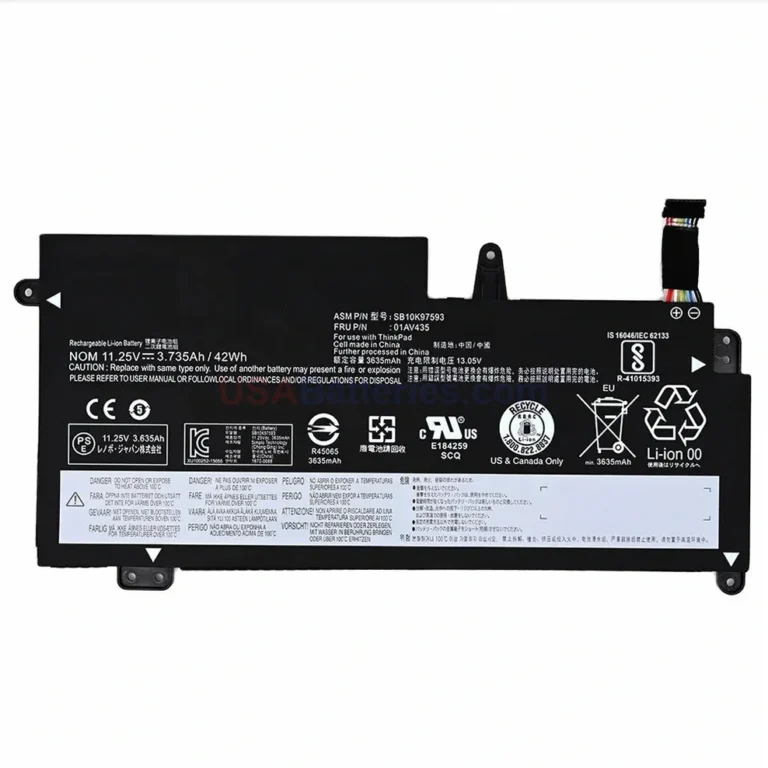
Lenovo 01AV401 Battery for ThinkPad S2-13
In stock